
Sagar Club Register
Signing up in the Sagar Club app is quick, but the choices you make here – which number, which password – follow your account for years. This guide slows the process down just enough to get it right.
SAGAR CLUB APP · REGISTER
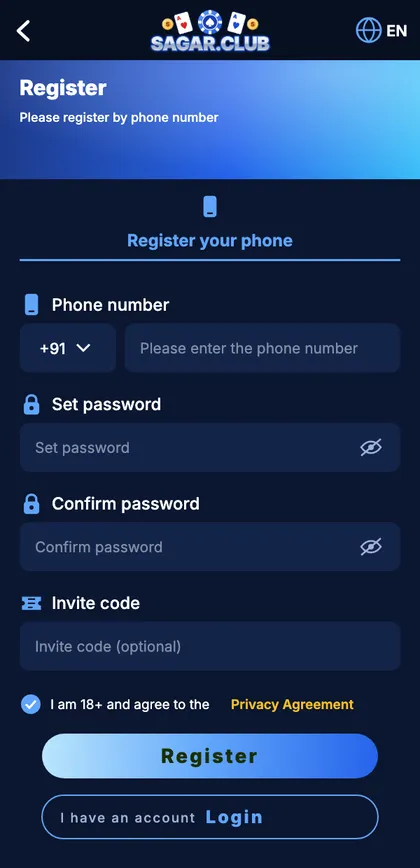
Sagar Club app register screen
Phone number, set password, confirm password, invite code and the 18+ agreement.
On this page
What to prepare
| You need | Notes |
|---|---|
| A mobile number | Indian, receives SMS, one you’ll keep |
| A password | 8+ characters, not used anywhere else |
| Two minutes | Phone in hand for the SMS |
| Age | 18 or older |
Register step by step
- Open the Sagar Club app (or the official site) and tap Register.
- Leave +91 alone and type your ten digits.
- Type a password, then type it again in the confirm box – by hand.
- Paste a friend’s invite code only if you have one.
- Tick the 18+ and privacy box.
- Tap Register and enter the 6-digit SMS code.
- The lobby opens with your UID at the top.
Each field, explained
Phone number
Your login ID and the destination for password-reset codes. Avoid office SIMs, a relative’s number or a short-term SIM.
Password
Think of three unrelated things and join them with a number – lamp-mango-bridge-61. Long, memorable, hard to guess.
Invite code
Links you to the friend who invited you. Optional; a wrong code can simply be cleared.
SMS code
Six digits, valid for a few minutes. Wait for the timer before asking for another.
Errors and fixes
Already registered
Log in or reset your password instead.
Passwords don’t match
Retype both by hand.
Code not coming
Check spam, DND and which SIM is active.
Invalid invite code
Clear the box and continue.
Button doesn’t respond
Tick the 18+ box.
First things after signing up
- Write down your UID.
- Swap the default nickname for one that isn’t your real name.
- Bind an email as a backup login.
- Switch on login alerts.
What happens when you tap Register
| Step | Check |
|---|---|
| 1 | Is the number already in use? |
| 2 | Do the passwords match? |
| 3 | Is the 18+ box ticked? |
| 4 | SMS sent – timer starts |
| 5 | Code checked – account created |
That order explains the errors: ‘already registered’ appears instantly because it’s the first check, while code problems show up later.
“Will other players see my number?”
No – they see your nickname.
“Do I need ID documents?”
No – a number, a password and the SMS code are enough.
Start with Sagar Club the safe way
Use the official app or website – one Sagar Club account works on every device.
Frequently asked questions
Is registration free?
Yes.
Is an invite code required?
No.
Can I sign up with email only?
No – use a mobile number, then bind an email.